Zoog AI is the new AI assistant from ZoogVPN, built for everyone who wants answers without giving away who they are. Your questions go through ZoogVPN instead of your personal accounts, so the AI never learns who is asking, and we don’t log or record your data. Use it from any country, on your phone or computer, with nothing to install.
Included with every ZoogVPN Premium plan. 7-day money-back guarantee.

Anonymous by design
Your chats go through ZoogVPN, not through your personal AI accounts, so the AI services don’t know who is asking. On our side, we don’t log or record your data, ensuring complete anonymity.
30% of AI users share personal or confidential details with AI tools, and 84% worry about that data going public. Zoog AI is built so those questions stay yours.
Requests go through ZoogVPN, so AI services never see who is asking.
Switch between GPT, Gemini, DeepSeek and Claude in one tap.

Same models and features wherever you are, with no regional blocks.

Choose maximum privacy or full chat history, chat by chat.

Paste a link, and Zoog AI reads the page behind the scenes and uses its content in the answer.
Coming soon
This new feature will be available in no time. Add documents and images to your chat, including PDF, DOCX, CSV and XLS files, and Zoog AI will use them as context for its answers. You will also be able to download files from the chat.
Zoog AI is included with every ZoogVPN Premium plan at no extra cost. Already have Premium? Just sign in and start chatting. New to ZoogVPN? Get Premium and use the VPN and the AI chat with one subscription.
Open the AI chat in any browser, on your phone or computer.
Log into your ZoogVPN account. No separate registration needed.
Choose a model and a mode, then type your first question.
Add Zoog AI to your Home Screen or desktop: watch the video guides →
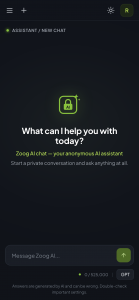
Zoog AI works in two modes that offer different levels of anonymity. In both, the assistant remembers the context of your conversation. The difference comes down to what matters more to you: maximum privacy or access to your full chat history.
🔒 Secure mode
The full chat context is kept only on your device, and our servers have no access to what these chats contain.
Ideal for personal and anonymous questions
💬 Regular mode
Built for convenient everyday use: your chats sync across your devices, and you can search or delete them at any time.
Ideal for tasks you’ll come back to
| 🔒 Secure mode | 💬 Regular mode | |
|---|---|---|
| Conversation context | Kept during the chat | Kept during the chat |
| Where chats are kept | Only in your browser | Synced to your account |
| Access from other devices | Unavailable | Available |
| Search and delete history | Unavailable | Available |
✓ Ask private questions in Secure mode. Make sense of a bank statement, a contract clause or lab results, with the chat kept only in your browser.
✓ Do complex research and analysis. Paste links to web pages, and Zoog AI reads them for you, then compares, summarizes or analyzes them in a clear, structured breakdown.
✓ Write faster. Draft emails, posts and replies, then refine them in the same chat.
✓ Get help while travelling. Translate a menu, plan a route or check local rules from any country.
✓ Learn something new. Get a complex topic explained step by step, at your own pace.
✓ Fix code. Paste a snippet and get it explained, reviewed or debugged.
And all of it while keeping your anonymity.
Get a fast, encrypted VPN and an anonymous AI chat with GPT, Gemini, DeepSeek and Claude in one subscription.
Zoog AI is included with every ZoogVPN Premium plan at no extra cost. If you already have Premium, just sign in with your ZoogVPN account. If not, you can upgrade anytime and get the VPN and the AI chat in one subscription.
Not yet. File and image uploads are in development and coming soon. You will be able to add PDF, DOCX, CSV and XLS files and images to your chat, and Zoog AI will use them as context for its answers. You will also be able to download files from the chat. For now, you can paste text or share links to web pages.
In both modes, the assistant remembers the context of your conversation. In Secure mode, the chat stays only on your device and our servers have no access to it. In Regular mode, your chats sync across your devices so you can return to any of them.
Zoog AI connects to the AI models through our servers using our own accounts, so AI services never see who is asking. In Secure mode, we don’t store or log anything: chats are processed in real time and kept only on your device, so we have no access to them. In Regular mode, your chats are stored encrypted and linked to your account so they can sync across your devices.
Zoog AI gives you GPT, Gemini, DeepSeek and Claude in one chat. Pick a model from the menu next to the message box and switch between them whenever you want. The exact version of each model depends on the current limits in our system, and we always aim to give you the smartest ones available. We also plan to add more AI models over time.
Yes. Zoog AI currently uses daily limits. Our team adjusts them based on how the service is used, so every user gets as much access as possible and the system stays fast and stable.
Yes. Zoog AI keeps the context of each chat, so you can ask follow-up questions and build on earlier answers. Each AI model can hold a limited amount of conversation at once. In very long chats, the earliest messages may drop out of context, so for best results, start a new chat for a new topic.
Yes. Zoog AI runs in any modern browser on iPhone, Android, Windows and macOS. It also works as a PWA (progressive web app), so you can add it to your Home Screen or desktop and use it like a regular app. See how to install Zoog AI.