

Apple has never once told a customer their iPhone was infected through a flashing red banner in Safari. Scammers, on the other hand, do it several million times a day.
The reason they bother is that impersonating Apple works. Check Point’s Q2 2026 brand phishing report puts Apple in the top five most impersonated brands worldwide, a group that together accounts for more than half of all brand impersonation attempts tracked that quarter. The money follows: older consumers alone reported $159 million lost to tech support scams in a single year, according to the FTC’s most recent report to Congress. This piece covers how the Apple security alert scam works, the specific tells that give a fake away, how to clear one off your device, and which tools actually reduce your chances of seeing one.
What the Apple security alert scam actually is
The name covers several different attacks that share one goal, so it helps to separate them before looking at how to spot each one.
At its core, this is brand impersonation. Scammers copy Apple’s typography, color palette, and logo closely enough that the warning feels official, then manufacture urgency so you act before you think. What they want varies: your Apple Account password, a verification code, payment for support you don’t need, or remote access to your device. The delivery method changes, but the psychological mechanism doesn’t.
Browser pop-ups and phishing pages
The most common version is a full-screen warning that appears while you’re browsing, claiming your device is infected or your account has been locked. These usually show up after a compromised page loads or a deceptive ad fires. Many are built to resist being closed, reloading themselves, disabling the close button, or spawning new tabs, because the longer you stay on the page, the more likely panic wins.
Emails, texts, and fake support calls
The same scam arrives by email warning of suspicious iCloud activity, by SMS claiming your Apple ID has been suspended, and by phone from someone identifying themselves as Apple Support. Phone-based versions are the most expensive on average, since the caller can improvise, reference details that build trust, and talk you past your own doubts in real time. Caller ID spoofing means a genuine-looking Apple number on your screen proves nothing.
How to tell a fake from the real thing
A handful of reliable tells separate every version of this scam from a genuine Apple message, and one of them settles the question on its own.
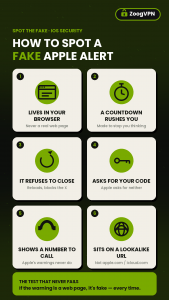
The single most useful test: real Apple security notifications never appear as a web page. They live in your iOS or macOS system settings, in official Apple apps, or in an email from a verified apple.com address. A security warning inside a browser window is fake, full stop, regardless of how convincing the design looks.
Top 5 Apple’s rank among the world’s most impersonated brands in phishing attacks, according to Check Point.
$159M reported lost to tech support scams by consumers aged 60 and over in a single year, according to the FTC.
$2,210 the median reported loss when a scam starts with a phone call, versus $650 when it starts on social media, according to the FTC.
50%+ share of all brand phishing attempts accounted for by just five impersonated companies, according to Check Point.
Beyond the browser test, a few other signals give the game away quickly. A phone number displayed inside a security alert is never legitimate, since Apple doesn’t put support numbers in warnings. Requests for your password, verification code, or payment are never genuine either, and Apple states plainly in its official guidance on social engineering scams that it will never ask you to disable a security feature, approve a two-factor prompt on request, or enter credentials on a page someone directed you to. Check the address bar too: genuine Apple pages sit on apple.com or icloud.com, not lookalike domains padded with extra words or unusual extensions. And watch the tone. Apple’s real communications are flat and informational, while scams lean on countdown timers, threats of deletion, and language designed to stop you from pausing.
Clearing a fake alert off your device
Getting rid of one of these is usually straightforward, though the steps differ slightly between iPhone and Mac.
On iPhone or iPad, start by force-quitting the browser through the App Switcher rather than trying to close the pop-up itself. Then clear your history and website data, since cached scripts from the scam page can retrigger the alert next time you open the browser. If warnings keep returning after that, check your installed apps for anything you don’t recognize and delete it, then restart the device.
On a Mac, quit the browser with Command + Q, or force-quit it if the window won’t respond. Review your browser extensions and remove anything unfamiliar, since malicious extensions can inject fake alerts into otherwise normal browsing. Then check System Settings for unknown device management or configuration profiles, which some adware installs to hijack browser behavior, and clear your browser cache before running a scan with trusted antivirus software.
How a VPN can help
A VPN won’t stop a scam phone call or talk you out of entering your password, so it’s worth being precise about the part it does cover.
Most fake Apple alerts arrive through a malicious ad or a compromised web page, which means there’s a moment before you ever see the warning when your browser is fetching content from a known bad domain. That’s the point a blocking layer can intervene. ZoogVPN’s Shield feature filters ads, trackers, and known malicious domains at the DNS level, so a page hosting a scam pop-up fails to load rather than filling your screen with a countdown timer.
The rest of what a VPN does is adjacent but still relevant. Encrypting your traffic on public Wi-Fi closes off the interception risks that come with logging into an Apple account from a cafe or airport, and masking your IP address gives ad networks and data brokers less material for the targeted profiling that makes some scam delivery more precise. What it cannot do is matter once you’ve picked up the phone: if someone talks you into reading out a verification code, no network tool intervenes. That part is habit, not software.
Worth knowing: ZoogVPN’s free plan includes 10 GB a month across up to ten devices, which covers the phones of family members most likely to take a scam support call seriously.
Block the page before the pop-up loads.
Habits that keep these scams from landing
Removing an alert solves today’s problem. These habits reduce how often you see one in the first place, and what happens if you do.
Turn on two-factor authentication for your Apple Account. Even if a phishing page captures your password, it’s worth far less without the code sent to your trusted device. This is the single highest-value step on the list.
Verify through Apple directly, never through the message. Sign in at account.apple.com or contact Apple Support through their website to check whether anything is actually wrong. Don’t call a number that appeared in the alert, and don’t follow its links.
Keep iOS and macOS current. System updates patch the browser and OS vulnerabilities many scam pages rely on, and turning on automatic updates removes the need to remember.
Turn on Safari’s fraudulent website warning and pop-up blocking. Both are built in and off by default for some users. They catch a meaningful share of known scam pages before they render.
Treat urgency itself as the warning sign. Countdown timers, threats of data deletion, and demands to act immediately exist to stop you from thinking. Any message engineering panic deserves more scrutiny, not less.
If you already interacted with one
Clicking a link or entering details doesn’t mean the damage is done, as long as you move quickly.
Change your Apple Account password immediately and confirm two-factor authentication is on. Review your account for unauthorized changes, especially trusted devices, linked email addresses, and phone numbers, since scammers often add their own to maintain access. If you shared payment details or authorized a transaction, contact your bank about a block or chargeback. Delete any apps or configuration profiles installed during the interaction. Then report it: phishing emails go to [email protected], and scam calls can be reported to the FTC at reportfraud.ftc.gov.
Frequently asked questions
A few questions come up often enough to answer directly.
Does Apple ever send real security alerts?
Yes, but they look nothing like the scam versions. Apple sends account notifications about new sign-ins or password changes through system settings or a verified apple.com email address. In rare cases involving targeted spyware, Apple also sends threat notifications that appear on your Apple Account page. None of these ask for payment, credentials, or a click on an unfamiliar link.
Why does the same fake alert keep coming back?
Usually cached data from the scam page, a malicious browser extension, or an unwanted app installed on the device. Clearing browser history and website data resolves most cases. If the alert persists, check extensions, installed apps, and configuration profiles before running an antivirus scan.
Can an iPhone actually get a virus?
Traditional viruses are rare on iOS because of how apps are sandboxed, which is exactly why “your iPhone is infected” pop-ups are such a reliable scam tell. The real risks are different: phishing pages that capture credentials, malicious configuration profiles, and apps installed outside the App Store.
Will a VPN stop these alerts entirely?
No. A VPN with DNS-level filtering blocks many of the malicious domains and ads that deliver scam pop-ups, which cuts down how often you encounter one. It has no effect on scam phone calls, phishing emails that reach your inbox, or a decision to enter your password somewhere you shouldn’t.
Is it safe to call the number shown in an Apple alert?
No. Apple doesn’t include phone numbers in security warnings, so any number appearing in one belongs to a scammer. If you want to check whether something is genuinely wrong, contact Apple Support through their official website instead.
Fewer scam pages, fewer chances to fall for one.
- Diana BestaievaContent Writer at ZoogVPN. Diana deeply explores the newest technologies and shares valuable insights engagingly and comprehensively. Keeping up with the tech news, she makes in-depth content, explaining complex concepts with ease.


