

If you’ve ever typed “Why won’t Netflix let me watch this?” into Google at 2 AM, congratulations – you’ve just experienced the moment when most people start learning about DNS, Smart DNS, and VPNs. And honestly, that’s fair! Modern internet services play hide-and-seek with content, and users end up trying every tool in existence just to watch a show they’ve technically paid for. But beyond streaming frustrations, there’s a deeper question many people eventually ask: which technology actually protects privacy, unlocks websites, and delivers fast, stable connections?
In the debate of Smart DNS vs VPN, the winner isn’t universal; it depends on your needs, your goals, and whether you care more about speed, privacy, or circumvent regional blocks. This article breaks down how DNS works, how Smart DNS servers differ from traditional DNS, why VPNs still dominate privacy and security, and how to choose the best tool for your daily digital life.
What Is DNS and How Does It Work?
Before comparing Smart DNS vs VPN, it’s important to understand the foundation that both rely on: DNS. Without DNS, the internet wouldn’t feel like the internet – it would feel like trying to dial a friend using their 16-digit phone number instead of their name. Needless to say, nobody wants that.
What is DNS? Short for Domain Name System – it’s a distributed, global directory that translates human-friendly domain names (like google.com) into machine-friendly IP addresses (like 142.250.190.78). When you open a website, your device contacts a DNS resolver, which finds the correct IP address, sends it back to you, and allows your browser to connect to the server hosting the site. This entire process happens in milliseconds, quietly and constantly, billions of times a day.
DNS as the Internet’s Address Book
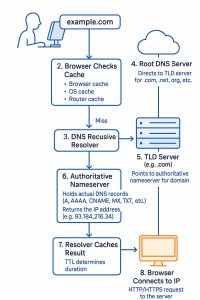
A DNS can be accurately described as a behind-the-scenes navigator: you ask for a website, and it points your browser in the right direction before you even blink. In practice, each time you enter a domain name, your request goes through several steps:
- Your device checks its local cache to see if it already knows the IP.
- If not found, it contacts your DNS resolver, usually provided by your ISP or a public DNS (like Google DNS or Cloudflare).
- The resolver queries root servers, which point it toward the right Top-Level Domain server (.com, .net, etc.).
- The TLD server points to the authoritative DNS server, which stores the actual DNS records.
- The resolver returns the IP address to you, and your browser loads the website.
All of this happens so quickly you don’t even think about it, unless something breaks.
Why DNS Matters for Content Access
DNS plays a huge role in how content is delivered and restricted. Many streaming services use DNS-based checks to decide whether you’re in the “correct” region. If your DNS resolver shows you’re in Poland, but the movies you want are only available in the U.S., you’re out of luck. This is where the Smart DNS server concept enters the picture.
A Smart DNS server modifies part of this lookup process by routing specific DNS queries through special proxy servers in allowed regions, tricking websites into thinking you’re connecting from a different location. It’s clever, fast, and designed for circumventing geo-blocks, but it offers zero encryption and zero privacy protection, which is why the Smart DNS vs VPN debate exists at all.
DNS Security Limitations
Standard DNS is incredibly efficient, but also flawed:
- DNS queries are typically unencrypted, meaning ISPs, network admins, and even some attackers can see the domains you’re visiting.
- DNS manipulation (DNS hijacking, spoofing, or blocking) is widely used by governments to enforce censorship.
- Your default DNS provider usually logs your activity.
Because of these weaknesses, newer protocols like DNS-over-HTTPS (DoH) and DNS-over-TLS (DoT) have emerged, but they still don’t replace full encryption and IP masking. And that’s where Smart DNS and VPN enter the story, each solving different parts of the privacy–speed–accessibility triangle.
What Is SmartDNS?
Smart DNS sits somewhere between traditional DNS and a VPN, not quite a full privacy tool, but much more advanced than your default ISP resolver. When people compare Smart DNS vs VPN, Smart DNS usually wins on pure speed, because it doesn’t encrypt traffic. Instead, it focuses on rerouting specific DNS queries through a Smart DNS server located in another region.
The result? Websites and streaming platforms believe you’re located somewhere else, which helps avoiding geo-blocking without the speed penalty of encryption. Smart DNS is popular among users who simply want faster access to restricted content, smoother streaming, and stable performance across multiple devices.
However, speed comes with trade-offs – some of them significant. To truly understand whether Smart DNS fits your needs, we need to break down how it performs in real-world scenarios.
Pros and Cons of SmartDNS
Before choosing between smart DNS vs VPN, it’s helpful to understand what Smart DNS does exceptionally well, and where it falls short. Smart DNS is designed for content unblocking, not privacy, and its advantages shine in environments where speed is crucial.
SmartDNS Pros & Cons
Smart DNS offers a lightweight, efficient approach to circumventing regional restrictions, but it isn’t built to protect your identity or keep your data private. The table below breaks down its biggest strengths and limitations in a simple, practical way.
| Pros | Cons |
| Ultra-fast speeds: No encryption, so streaming and downloads stay near full bandwidth. | No encryption: Your traffic remains visible to ISPs, network admins, and potential attackers. |
| Ideal for streaming: Many Smart DNS providers optimize their Smart DNS servers for Netflix, Hulu, Disney+, BBC iPlayer, and more. | No IP masking: Your real IP address is fully exposed, reducing privacy dramatically. |
| Works on devices a VPN can’t cover: Smart TVs, consoles, routers, older systems. | Limited privacy: Smart DNS is not a security tool; it only reroutes certain DNS queries. |
| No change to local browsing: Because your IP stays the same, local websites and apps function normally. | Easier to block: Streaming services can detect Smart DNS setups more easily than VPN tunnels. |
| Simple setup: Usually requires changing DNS settings once; no apps needed. | No protection on public Wi-Fi: Traffic is unencrypted and vulnerable anywhere. |
Smart DNS is a fantastic tool for streaming lovers, but if privacy or data protection matters, it’s not a complete solution.
When to Use SmartDNS
Smart DNS is the right choice when you want to access region-locked content without sacrificing speed. Unlike a VPN, it doesn’t encrypt traffic or change your IP address; it simply reroutes specific DNS queries through a Smart DNS server to make streaming platforms show you a different content library. Thus, Smart DNS smoothly fits users who prioritize fast, seamless access to restricted media and don’t need strong privacy features. In case your goal in the smart DNS vs VPN comparison is pure performance, Smart DNS will feel like the seamless, faster option.
Top Real-World Scenarios for SmartDNS
Choosing when to use Smart DNS becomes much easier once you dive deep to what it’s built for. Smart DNS efficiently addresses very specific situations where speed is a top priority, encryption isn’t needed, and the goal is unlocking content rather than disguising your identity.
1. Streaming Region-Locked Movies and Shows
This is the number one reason people switch to Smart DNS. Services like Netflix, Hulu, BBC iPlayer, Max, and others use DNS-based checks to decide what library you get. A Smart DNS server reroutes only those checks, giving you access to the full catalogue at maximum speed, including 4K and high-bitrate video.
2. Using Devices Where VPN Apps Don’t Work
Many TVs, gaming consoles, and media boxes don’t support VPN apps. Smart DNS solves this by letting you change DNS settings directly on the device or router. You get region unlocking without complex setups or additional hardware.
3. Avoiding Speed Drops While Unblocking Websites
Since Smart DNS doesn’t encrypt your connection, it’s excellent in scenarios where raw speed is more important than security, for example, when you’re gaming, video calling, or streaming live sports and want zero latency impact.
4. Traveling and Accessing Home Content Libraries
Smart DNS makes it effortless to access your home region’s streaming libraries, websites, and apps while travelling abroad. Smart DNS avoids the speed drop that encryption can cause. You get full access to your usual shows, sports broadcasts, and platforms exactly as if you were still at home while keeping your connection fast, stable, and hassle-free.
5. Maintaining Local App Behavior
In contrast to VPNs, Smart DNS doesn’t change your IP address. Your banking apps, delivery apps, and streaming services continue functioning as if you’re still at home, while specific platforms receive region-matching DNS responses.
DNS vs Smart DNS vs VPN – When to Use Each
Proxy servers sometimes enter the DNS vs Smart DNS vs VPN discussion because they also route your traffic through another location. However, their functionality is far more limited. A proxy simply forwards your requests to a website, acting as a basic middleman. While this may look similar to what VPNs or Smart DNS systems do, the similarity ends there.
Most proxies don’t encrypt your traffic, don’t hide your activity from ISPs or trackers, and don’t offer consistent reliability. Modern websites frequently block them, and free proxies in particular come with serious risks, from logging data to injecting ads or even stealing credentials. Paid proxies are safer but still far from ideal for streaming, privacy, or bypassing restrictions.
In short, a proxy can mask your location, but it can’t protect your data or guarantee stable access. It’s best viewed as a quick workaround rather than a long-term solution.
If you want the full deep-dive explanation, you can check out the complete guide: What Is a VPN?
| Use case | Best option | Why |
| Daily privacy & public Wi-Fi | VPN | Provides full encryption, IP masking, and protection against tracking, making your data unreadable on any network. |
| Streaming without slowdown | SmartDNS | Delivers the fastest performance thanks to zero encryption overhead, ensuring smooth 4K/HD streaming and reliable geo-unblocking. |
| Basic browsing only | DNS | Simple, default, and lightweight, sufficient for everyday browsing when you don’t need privacy or region-switching. |
| Avoiding censorship | VPN | Creates a secure encrypted tunnel and hides your IP, allowing you to access blocked sites and services in restricted regions. |
DNS, SmartDNS, or VPN – Which Is Right for You?
Smart DNS and VPNs serve different goals, so calling one “better” depends entirely on what you need from your connection. If speed and streaming access are your priority, Smart DNS takes the lead. It bypasses geo-blocks without adding encryption, allowing 4K streams, gaming, and live events to run at full bandwidth. It also works seamlessly on TVs, consoles, and devices where VPN apps aren’t always supported.
However, this performance comes with a trade-off: Smart DNS offers no privacy. It doesn’t hide your IP address, doesn’t encrypt your data, and won’t stop your ISP, advertisers, or network admins from monitoring your activity. That’s where a VPN clearly outperforms it. A VPN encrypts all your traffic, protects you on public Wi-Fi, masks your real location, and provides a far stronger defence against censorship, surveillance, and targeted tracking.
So the comparison is simple:
- For speed and effortless streaming: choose Smart DNS.
- For privacy, anonymity, and security: choose a VPN.
- For everyday browsing with no special needs: basic DNS is enough.
The smartest approach is to pick the tool that aligns with your usage. Smart DNS is ideal for fast global content access, while VPNs deliver the comprehensive protection you need for sensitive tasks, travel, remote work, and restricted networks.
FAQ
What is the difference between SmartDNS and VPN?
Smart DNS reroutes only specific DNS queries to help you circumvent geo-restrictions without slowing your connection. A VPN encrypts all your traffic, masks your IP address, and provides full privacy and security. Smart DNS is optimized for speed; VPNs are built for protection.
Is SmartDNS legal?
Yes. Smart DNS is legal in most countries because it does not modify traffic or hide your IP, it simply changes how DNS requests are routed. However, streaming platforms may restrict access if they detect Smart DNS usage.
Is using a VPN legal?
In most countries, VPNs are fully legal. They’re commonly used by businesses, travelers, and privacy-focused users. A few regions with heavy censorship regulate or restrict VPN usage, but personal use is generally allowed.
Is SmartDNS good for streaming?
Yes. Smart DNS is one of the best tools for streaming because it keeps full bandwidth, avoids encryption delays, and reliably unblocks region-locked platforms like Netflix, Hulu, Disney+, and BBC iPlayer.
Do I need both SmartDNS and VPN?
Not necessarily. If you want streaming speed, Smart DNS alone is fine. If you want privacy, use a VPN. Some users combine both: VPN for secure browsing, Smart DNS for maximum streaming performance.
Will SmartDNS protect me on public Wi-Fi?
No. Smart DNS provides zero encryption. Anyone monitoring the network, ISPs, attackers, or Wi-Fi owners, can still see your activity. For public Wi-Fi protection, a VPN is essential.
What device do I need to use SmartDNS?
Smart DNS works on almost any device that allows manual DNS configuration: smart TVs, streaming boxes, gaming consoles, laptops, routers, and mobile devices. This makes it more compatible with entertainment hardware compared to many VPN apps.
- Diana BestaievaContent Writer at ZoogVPN. Diana deeply explores the newest technologies and shares valuable insights engagingly and comprehensively. Keeping up with the tech news, she makes in-depth content, explaining complex concepts with ease.


