


ChatGPT became a global sensation almost overnight, hitting 100 million users in record time. Today, it’s part of everyday life for students, professionals, and businesses for drafting reports, coding snippets, or even brainstorming dinner ideas.
But here’s the big question: is ChatGPT safe? The answer isn’t black and white. ChatGPT itself isn’t dangerous software, it won’t install malware or hijack your device. Yet, like any online service, it retrieves data, stores conversations, and could expose you to risks if used carelessly. Add to that the rise of fake ChatGPT apps and AI-powered phishing scams, and caution suddenly feels more important.
In this article, we’ll explore how safe ChatGPT really is, what security measures OpenAI has in place, what risks you should watch for, and how tools like a VPN can elevate your protection.
Is ChatGPT Safe to Use?
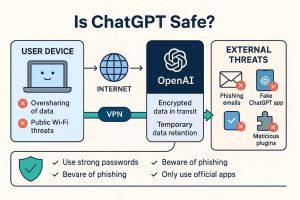
In broad terms, yes. OpenAI has put several safeguards in place: your chats are encrypted in transit, the system is regularly audited, and strict content filters limit harmful outputs. There’s even a bug bounty program to encourage independent researchers to find vulnerabilities before attackers do.
That said, ChatGPT is not a sealed vault. Conversations may be reviewed by humans, your account data (name, email, payment info) is collected if you register, and anonymized usage logs are retained. It’s no different from many online platforms: relatively safe when used wisely, but not risk-free if you overshare or rely on shady third-party integrations.
Think of ChatGPT as a helpful coworker, perfectly fine to brainstorm with, but you wouldn’t hand them your house keys and bank login.
What Security Risks Come With ChatGPT?
The real risks surrounding ChatGPT do not come from the chatbot itself becoming malicious, but from how generative AI systems are misused, how data is handled, and how attackers exploit the platform’s growing adoption. As Takale, Mahalle, and Sule (2024) note,:
“ChatGPT may be abused for writing malicious code, generating false information, bypassing security restrictions,” while also presenting “privacy issues such as training data leakage, model poisoning, and information reconstruction.” The authors further highlight that researchers have already identified multiple ChatGPT-related attack vectors, including “prompt injection, phishing email generation, [and] model stealing.”
Data Retention and Review
ChatGPT stores conversations for at least 30 days and may use them to improve the system. This means your inputs aren’t instantly erased. Even if you disable history, anonymized data may still be retained.
Accidental Oversharing
Plenty of users have pasted sensitive files, passwords, or business documents into ChatGPT. If OpenAI were ever breached, or if that data somehow leaked, the consequences could be serious.
Phishing and Impersonation
AI makes phishing harder to detect. Fraudsters use ChatGPT to generate flawless, convincing emails or even fake customer support bots. Meanwhile, counterfeit ChatGPT apps and websites pop up to trick people into sharing credentials or downloading malware.
Third-Party App Risks
When using ChatGPT through third-party apps or integrations, your data doesn’t just go to OpenAI, it may also be logged or misused by that third party. Weak policies here can leave your information exposed.
Data Breaches
ChatGPT data collection puts your information at a certain risk. Like any online platform, it isn’t immune to breaches. OpenAI assembles personal details when you register (name, email, sometimes billing info). If attackers ever accessed that, the fallout could be significant.
Misinformation and Fake News
ChatGPT doesn’t always get it right. It can sound authoritative while being factually wrong, which means relying on it without double-checking can spread misinformation.
Malware Creation
Though OpenAI blocks malicious requests, hackers can sometimes manipulate ChatGPT to generate harmful code. It’s less about ChatGPT infecting you directly, and more about bad actors weaponizing the tool.
How a VPN Helps Protect You While Using ChatGPT
A VPN isn’t a silver bullet, but it strengthens your overall security and reduces several ChatGPT privacy concerns.
Hide Your IP Address
Without a VPN, your IP and location may be linked to your conversations. A VPN masks that information, making it harder to tie your activity back to you.
Secure Public Wi-Fi Sessions
Airports, cafés, hotels – all prime hunting grounds for hackers. If you use ChatGPT on open Wi-Fi, a VPN encrypts your traffic and blocks interception.
Circumvent Censorship or Restrictions
In some countries, ChatGPT is restricted or banned. A VPN lets you connect safely from another location and access the service without blocks.
Reduce Tracking by ISPs or Ads
Even if ChatGPT itself isn’t the worry, your internet provider or ad trackers may log your usage patterns. A VPN stops that data trail. For example, ZoogVPN offers AES-256 encryption, a strict no-logs policy, and reliable access from censored regions like China or the UAE, catering to the needs of AI users who seek tools for robust privacy.
Tips to Stay Safe When Using ChatGPT
Using ChatGPT securely is less about paranoia and more about smart digital habits:
- Never paste in private or confidential information.
- Use strong, unique passwords for your account.
- Regularly update and secure your device with antivirus software.
- Stick to official sources: chat.openai.com or the verified app.
- Disable chat history if you prefer not to store logs.
- Stay informed: phishing, fake apps, and AI misuse evolve quickly.
Can ChatGPT Be Used for Hacking or Malware?
ChatGPT itself doesn’t run code on your device, so no, it won’t infect you directly. But yes, others can use it to write malicious scripts or generate highly convincing phishing content. The risk is indirect: you’re vulnerable not because you use ChatGPT, but because someone else abuses it.
Common Myths About ChatGPT and Privacy
Because ChatGPT feels like “just chatting,” many people assume it works like a private, ephemeral conversation. But that’s not the case. Misunderstanding how it stores, processes, and safeguards your data can give you a false sense of security. Let’s bust a few of the most common myths.
“ChatGPT is anonymous.”
Not exactly. While your name doesn’t appear next to every message, OpenAI still collects metadata such as your IP address, device information, and browsing details. This means your activity can, in theory, be tied back to you. Using a VPN helps reduce this footprint, but ChatGPT itself is not a fully anonymous platform.
“It deletes everything immediately.”
This is a big misconception. Unless you manually disable chat history or delete conversations, OpenAI retains them for at least 30 days and may anonymize and use them for training and moderation. Even when you hit delete, some anonymized data may persist in system logs. It’s not quite “forever,” but it’s far from instant erasure.
“It can see your files or device.”
False. ChatGPT doesn’t have access to your system, camera, or personal files. It only knows what you choose to type or upload. The danger comes when users voluntarily provide sensitive information, not from ChatGPT secretly “peeking” into your device.
“ChatGPT can’t be used for anything harmful.”
Unfortunately, it can. While the platform has filters, determined users have figured out ways to generate phishing emails, disinformation, or even code snippets that could be misused. ChatGPT won’t infect your computer directly, but others can exploit it as a tool.
“Disabling chat history means no data is collected.”
Disabling history reduces storage of your conversations, but OpenAI may still retain limited data (like timestamps, technical logs, or anonymized content) for service improvement and security compliance. It lowers risk, but it doesn’t make your use invisible.
Final Verdict – Is ChatGPT Safe?
ChatGPT is generally safe, backed by encryption, audits, compliance with laws like GDPR, and multiple security filters. But it’s not invincible; oversharing, fake apps, and phishing attempts remain real threats.
Used responsibly, it’s a powerful tool. Combine digital hygiene (think: no secrets in the chat box, strong passwords, verified apps) with protective layers like a VPN and antivirus, and you’ll dramatically reduce ChatGPT security risks.
Stay private while you chat. If you’re using ChatGPT, pair it with ZoogVPN to mask your IP, encrypt your traffic, and stay secure wherever you are. Get ZoogVPN now – fast, private, and built for safe browsing in the AI era.
FAQ
How secure is ChatGPT?
ChatGPT is generally secure but not risk-free. OpenAI encrypts chats in transit, runs audits, and has filters to reduce harmful outputs. However, conversations may be stored for at least 30 days, and some may be reviewed by humans. OpenAI also collects account data like email, IP, and device details.
Does ChatGPT collect personal data?
Yes. When you use ChatGPT, OpenAI collects basic account details (like your name, email, and payment info if you’re on a paid plan), along with your chat inputs. It also logs technical data such as your IP address, browser type, device information, and usage patterns. Some of this data is stored for at least 30 days and may be anonymized for system improvement and security monitoring. While OpenAI follows privacy regulations like GDPR, it’s important to remember that your chats are not completely private or instantly deleted.
Can I delete my ChatGPT history?
Yes, you can delete your conversations in your account settings, and you can also disable chat history to prevent new interactions from being saved. However, even if you delete chats, OpenAI may retain anonymized or limited data (such as timestamps, logs, or technical metadata) for system performance, troubleshooting, and compliance purposes. This means deletion lowers visibility but does not completely erase all traces of your usage.
Is ChatGPT safe on mobile?
Yes, if you use the official OpenAI app from trusted app stores like Google Play or Apple’s App Store. The app uses the same encryption and security measures as the web version. The real risk comes from unofficial or “clone” apps that pretend to be ChatGPT but instead harvest your data or install malware. Always double-check the developer name (OpenAI) before downloading, and avoid sideloaded APKs or third-party versions.
Is ChatGPT hack-proof?
No online service is 100% hack-proof. OpenAI has strong protections in place, including encryption, monitoring, and a bug bounty program to catch vulnerabilities early. That said, any platform that stores personal data could become a target for cyberattacks. If a breach ever occurred, information like your email, usage logs, or billing details could be exposed. Protecting your own account with strong, unique passwords and enabling multi-factor authentication (if available) adds an extra layer of safety.
Is ChatGPT safer than alternatives like DeepSeek?
Generally, yes. OpenAI is more transparent about its data handling and publishes regular security updates and compliance reports, including adherence to GDPR and other international privacy laws. Some competitors may not disclose as much about how they store or use your data. That said, “safer” is relative. While OpenAI offers stronger safeguards, ChatGPT still collects and retains data, meaning users should avoid oversharing sensitive or confidential information no matter which AI platform they use.
- Diana BestaievaContent Writer at ZoogVPN. Diana deeply explores the newest technologies and shares valuable insights engagingly and comprehensively. Keeping up with the tech news, she makes in-depth content, explaining complex concepts with ease.


