

Malware has changed a lot, over the years.
It’s no longer just frozen laptops or suspicious files. Modern malware is faster, quieter, and far more organized. It steals passwords, locks companies out of their own systems, and disrupts hospitals, sometimes all at once.
The scariest part? Most attacks don’t start with genius-level hacking. They start with one stolen password. One fake download. One system nobody bothered to update.
Here are three of the most notorious malware threats from 2020 to 2026 and why it matters to you.
1. Qilin Ransomware
Qilin became one of the most talked-about ransomware threats of the mid-2020s — and not for good reasons.
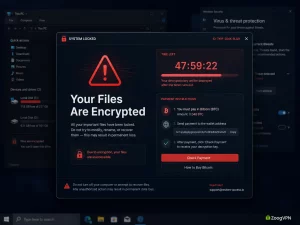
Most ransomware locks your files and demands payment. Qilin goes further. It steals your data first, then locks your systems. That gives attackers two ways to squeeze victims:
Pay to get your files back.
Pay again so your data doesn’t end up online.
Lovely people, clearly.
One of the most serious Qilin-linked attacks happened in 2024, when Synnovis — a pathology provider serving several London hospitals — was hit. Blood tests were delayed. Medical services across parts of the UK’s National Health Service were disrupted. Real patients. Real consequences.
That’s what separates modern ransomware from a “computer problem.” It bleeds into the real world.
Qilin also exposed a tactic attackers love: go after the supplier, not the hospital. You don’t need to break through the front door if a side entrance is wide open.
Why it matters
Your personal data lives in more places than you think — hospitals, insurers, schools, employers. If their vendors are vulnerable, so is your data. You never handed it to the attacker. But it got there anyway.
Your data travels more than you do.
2. Akira Ransomware
Akira showed up in 2023 and moved fast.
Despite the cool name, this isn’t a cyberpunk movie. It’s ransomware that hit businesses, healthcare organizations, financial firms, and schools — following the same double-extortion playbook as Qilin. Steal the data. Lock the systems. Demand payment. Threaten to publish everything if you don’t comply.
What makes Akira especially relevant is the era it thrives in.
After 2020, companies leaned hard into remote work — VPN connections, cloud platforms, employee devices outside the office. More flexibility, yes. But also more entry points.
Cybercriminals noticed. Of course they did. Terrible, not stupid.
Most Akira attacks trace back to the same weak spots: stolen credentials, missing multi-factor authentication, unpatched systems, and remote access tools that were never properly secured. Attackers don’t need to be clever. They just need to find the easiest door.
Why it matters
Remote access security is no longer optional. One weak password on a work account can hand attackers a path into an entire business network. From there they can steal files, kill backups, and deploy ransomware before anyone notices.
Work accounts need stronger protection than “same password I use everywhere, but with a 1 at the end.”
Strong passwords. Two-factor authentication. Updated devices. A VPN on public Wi-Fi.
Your laptop at a cafe feels harmless. To an attacker, it can look like a doorway.
3. Lumma Stealer
Not all malware wants to make noise.
Some prefers to stay quiet, sit on your device, and take what it came for.
Lumma Stealer is an infostealer. Its job isn’t to lock your screen or demand money. It’s to quietly collect saved passwords, browser cookies, credit card details, crypto wallet data, autofill information, and login credentials — then send it all back to whoever deployed it.
Less dramatic than ransomware. Just as dangerous. Maybe more so for everyday users.
Because infostealers don’t go after servers or corporate networks. They go after the keys to your digital life — your email, your banking apps, your social media, your saved sessions.
Lumma became especially notorious in 2025, when Microsoft and international partners dismantled its infrastructure. Before that, hundreds of thousands of Windows devices had reportedly been infected in just a few months.
It spreads through fake downloads, cracked software, malicious ads, phishing emails, and fake update prompts.
Free premium software? Suspicious.
A random invoice attachment from someone you’ve never heard of? Suspicious.
A download button surrounded by twelve pop-ups? Extremely suspicious. Please love yourself.
Why it matters
Lumma doesn’t need to shut down a hospital to cause real damage. If it grabs your passwords or active browser sessions, attackers can walk into your accounts without triggering a single alarm. No hacking required. Just your credentials, handed over quietly.
And if you reuse passwords — which most people do — one infected device can unlock far more than you’d expect. You didn’t give them a password. You gave them a master key.
What These Threats Have in Common
Qilin, Akira, and Lumma are different tools. But they’re all chasing the same thing: access.
Access to your files. Your accounts. Your business systems. Your personal data.
And most of the time, they get it through the same familiar gaps:
- Reused passwords
- Phishing emails
- Outdated software
- Unsafe downloads
- Unprotected remote access
- Missing two-factor authentication
- Unsecured networks
Cybersecurity doesn’t fail because attackers are brilliant. It fails because someone clicked the wrong link, skipped an update, or used the same password since 2017.
No judgment. Okay, a little.
How to Protect Yourself
No single tool stops everything. Anyone promising otherwise is selling snake oil with a padlock logo.
But the basics still work — and most people skip them.
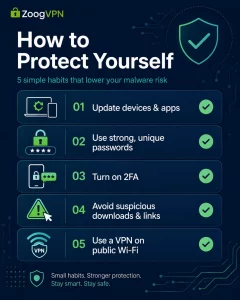
Keep your devices and apps updated. Attackers actively exploit known vulnerabilities, and updates close those gaps before they can.
Use strong, unique passwords. A password manager makes this effortless. There’s no excuse anymore.
Turn on two-factor authentication — for email, banking, work accounts, and anything you’d genuinely panic about losing access to.
Avoid suspicious downloads, cracked software, fake updates, and unexpected attachments. If something feels off, it probably is.
Back up your files. Ransomware loses most of its power when you have a clean copy somewhere safe.
And when you’re on a network you don’t control — a cafe, an airport, a hotel — use a VPN.
A VPN won’t remove malware from your device. It won’t save you from downloading something called “free_movie_totally_safe_2025.exe.” But ZoogVPN does encrypt your internet traffic, keeping your connection private on networks that have no business being trusted. Especially useful if you work remotely, travel often, or log into anything sensitive outside your home.
Final Thoughts
The most notorious malware threats of 2020–2026 tell you exactly where cybercrime is heading.
Ransomware groups like Qilin and Akira aren’t slowing down. Infostealers like Lumma are getting quieter and more effective. Different methods. Same goal — get in, take what matters, make someone pay.
You don’t need to become a security expert. But you should stop making it easy for them.
Update your software. Use better passwords. Turn on two-factor authentication. Avoid shady downloads. Back up your files. And protect your connection with ZoogVPN when you’re on networks you don’t fully trust.
KEEP THE DOOR LOCKED
Malware looks for the easiest way in. ZoogVPN makes sure your connection isn’t it.
Every time you go online with ZoogVPN, your real IP is hidden — so attackers, trackers, and data brokers can’t connect your browsing to your identity. No breadcrumbs. No profile being built.
Think of it as locking the door after you’ve read the warning signs.
- Roksolana KogutRoksolana dives deep into online privacy, security, and the tools that make the internet work better for everyone. She has a natural taste for taking technical subjects and making them feel approachable, useful, and worth reading.


