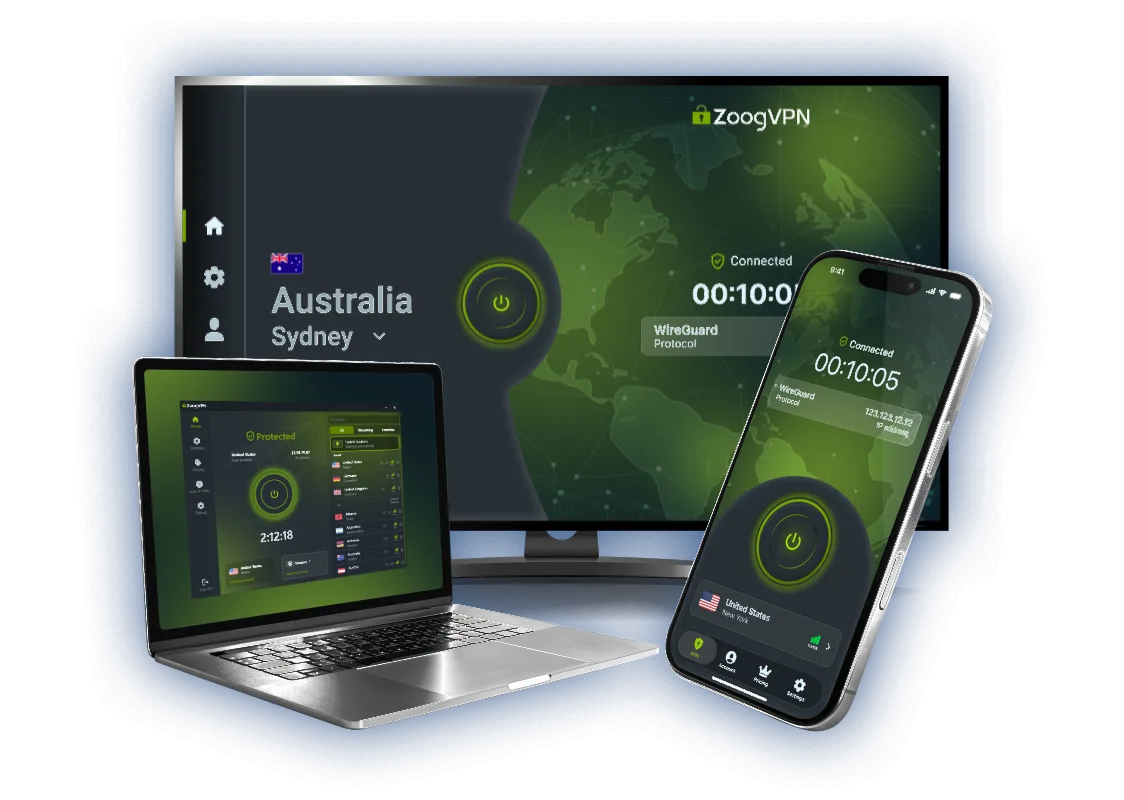
What Is a VPN?
VPN stands for Virtual Private Network. A VPN is a service that encrypts internet traffic and routes it through a secure remote server, masking the real IP address and protecting the connection from external access.
The most common reasons for adopting a VPN in day-to-day internet use include protecting personal data, maintaining privacy online, securing connections on public Wi-Fi networks, and accessing content that may be restricted by location or network policies.



- 7-day money-back guarantee

Why Use a VPN?
The internet wasn’t built with privacy as a default. In many cases, your connection exposes details like your IP address and traffic metadata, which can be logged by networks, analyzed for profiling, or intercepted on unsafe Wi-Fi.
The value of a VPN lies in core aspects: it encrypts data, masks your real IP address, and helps keep your location private at the network level. It’s also a smart layer of protection on public Wi-Fi in places like cafes, hotels, and airports. And in some situations, it helps reduce common restrictions, such as censorship, geo-blocks, or ISP throttling that slows certain types of traffic.
What Does a VPN Hide?
A VPN hides specific network-level information by design.
Real IP Address
Your actual IP is replaced with the VPN server’s IP, preventing websites from identifying or linking activity directly to your connection.
Approximate Physical Location
Your real location is hidden at the network level, making it difficult to determine your city or country based on your connection.
Traffic From Your ISP
Internet service providers can see that you’re connected to a VPN, but not which websites, apps, or services you’re using.
Public Wi-Fi Activity
Data sent over open or shared networks is encrypted, reducing the risk of interception by other users on the same network.
Traffic Metadata
Information such as request destinations and connection patterns is masked, limiting passive monitoring and analysis.
Network-Based Tracking
Third parties relying on IP and connection data cannot reliably build profiles of your browsing behavior.
A VPN Does NOT Hide
- Activity on websites where you are logged in When you sign in to an account, the website can still associate actions with that account, regardless of whether you’re using a VPN.
- Browser fingerprinting Details like screen resolution, installed fonts, language settings, and browser extensions can be combined to identify a device even without an IP address.
- Your browser history on your own device A VPN does not erase local browsing history, cookies, or cached data stored in your browser.
- Data you share voluntarily Information entered into forms, emails, social networks, or online accounts is visible to the services you interact with.
- Malware already installed on your device A VPN cannot remove spyware, keyloggers, or other malicious software that already has access to your system.
Risks of Not Using a VPN
IP Address and Location Exposure
Without a VPN, websites, advertisers, and third parties can see your real IP address and estimate your physical location, making tracking and profiling easier.

Data Interception on Public Networks
On open Wi-Fi in cafes, hotels, or airports, unencrypted traffic can be intercepted, increasing the risk of session hijacking and data leaks.

ISP Monitoring and Traffic Control
Internet providers can log your online activity and apply throttling to specific services or traffic types, affecting speed and privacy.
What Is a VPN Used For? (Use Cases)
VPNs are used in a wide range of everyday and professional scenarios where privacy, security, or unrestricted access matters. Discover the most common use cases, with direct links to ZoogVPN’s dedicated guides.
Stay Safe & Anonymous
A VPN encrypts your traffic and hides your real IP address, making everyday browsing more private and harder to track.
Avoid ISP Throttling
By masking your online activity, a VPN can help prevent selective speed limits applied by some internet providers.
Unrestricted Internet
A VPN allows access to websites and services blocked by censorship, workplace filters, or local network rules.
VPN for Streaming
Changing your virtual location lets you use streaming platforms while being abroad, without exposing your real connection.

VPN for Gaming
VPNs protect your IP address during online play and can help stabilize connections on restricted or unstable networks.

VPN for Torrenting
A VPN encrypts P2P traffic and hides your IP address, adding privacy when downloading or sharing files.
How Does a VPN Work?
The entire exchange described below happens in milliseconds and runs continuously while the VPN is active.
- Request is Created You open a website or app, and your device generates a standard internet request.
- Traffic is Encrypted The VPN app encrypts the request before it leaves your device, protecting its contents from inspection.
- Data Travels Through the VPN Tunnel The encrypted request is sent through a secure tunnel to the VPN server, isolated from the public network.
- VPN Server Forwards the Request The server decrypts the request and sends it to the destination using its own IP address.
- Response Returns Securely The website’s response is sent back to the VPN server, re-encrypted, and delivered to your device, where it is decrypted and displayed.
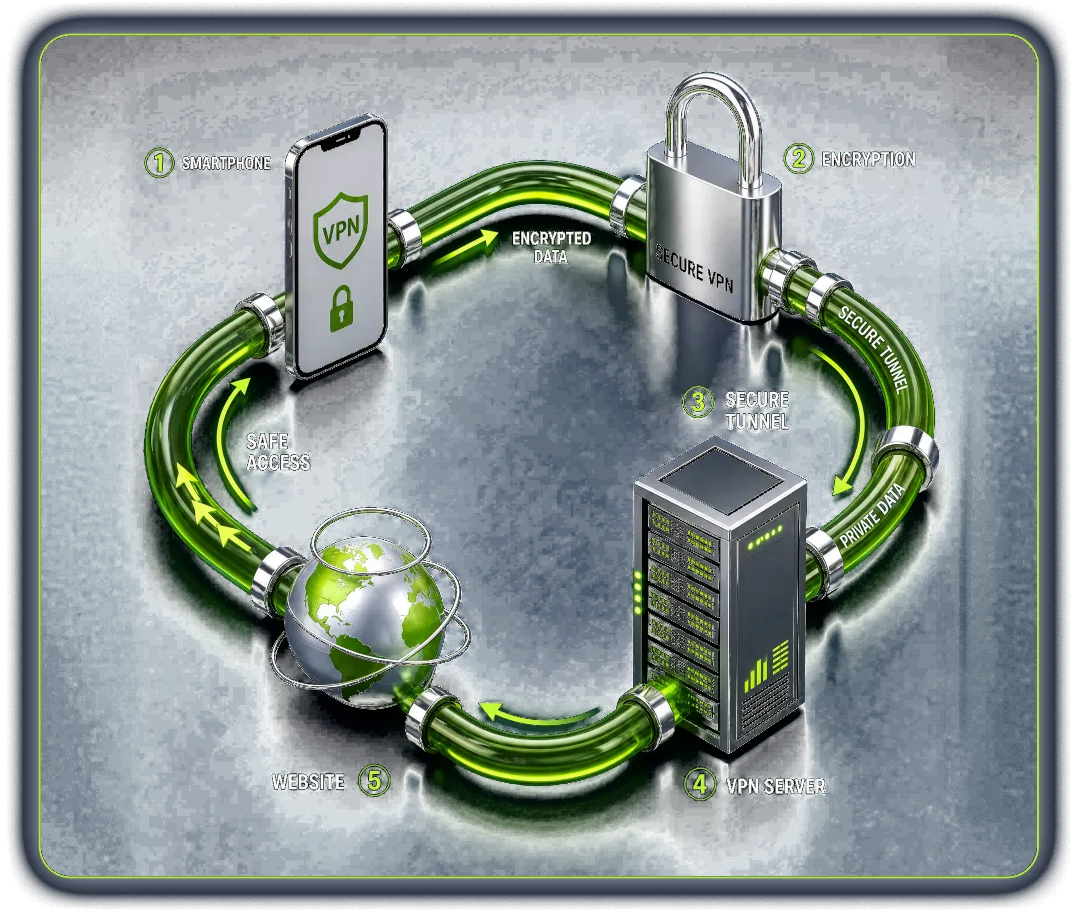
Key VPN Components
VPN Tunnel
Secure channel that carries your data between your device and the VPN server.
A VPN tunnel isolates your internet traffic from the public network. All requests and responses travel through this protected path, reducing the risk of interception, monitoring, or tampering while data is in transit.
Encryption
Protects data by converting it into unreadable code.
Encryption transforms plain data into encoded information before it leaves your device. Only authorized systems can decrypt it, which keeps sensitive data safe even if traffic is intercepted.
VPN Server
Remote server that routes traffic and hides your IP address.
The VPN server acts as an intermediary between your device and the internet. It forwards your requests, returns responses, and replaces your real IP address with its own.
VPN Client (App)
Application that establishes and controls the VPN connection.
The VPN client manages encryption, server selection, and protocol settings. It creates the secure tunnel and maintains the connection while the VPN is enabled.
VPN Connection
Active encrypted link between your device and the VPN server.
A VPN connection keeps all internet traffic encrypted and routed through the VPN server. As long as it remains active, your data stays protected at the network level.
VPN Protocol
Set of rules that define how VPN connections work.
VPN protocols determine how data is encrypted, authenticated, and transmitted. Different protocols offer different trade-offs between speed, security, and reliability.
Vulnerability Points Without a VPN
Without a VPN, your internet traffic is exposed at multiple points. ISPs can see connection metadata and monitor which services you use. On public Wi-Fi, unencrypted sessions are easier to intercept, increasing the risk of data leaks. Your real IP address remains visible, making tracking and profiling straightforward for websites and advertisers. In some cases, traffic can also be logged, throttled, or manipulated as it moves through the network. A VPN reduces these risks by encrypting traffic and routing it through a secure tunnel, limiting who can see or interfere with your connection.

VPN Protocols Comparison
VPN protocols define how a VPN connection is established, secured, and maintained. Each protocol balances speed, security, and compatibility in a different way. Some are built for stability and broad device support, while others focus on performance or seamless mobility. Understanding these differences helps you choose a protocol that matches your device, network conditions, and privacy expectations.
-
OpenVPN
A long-established, open-source protocol known for strong security and flexibility. It supports robust encryption, works across most platforms, and has been extensively audited, which makes it a reliable default for many users.
Read more -
IKEv2/IPSec
A fast and stable protocol that excels on mobile devices. It quickly reconnects when switching networks, such as from Wi-Fi to mobile data, and maintains strong security through the IPSec framework.
Read more -
WireGuard
A modern, lightweight protocol designed for speed and simplicity. It uses a smaller codebase than traditional protocols, which reduces attack surface and often delivers better performance, especially on newer devices.
Read more -
L2TP/IPSec
An older tunneling protocol paired with IPSec for encryption. While it’s more secure than early VPN standards, it tends to be slower and less efficient than modern alternatives.
Read more -
PPTP
One of the earliest VPN protocols. It offers fast connections but has known security weaknesses and is considered unsafe for protecting sensitive data.
Read more -
SSTP
A protocol developed primarily for Windows environments. It uses SSL/TLS encryption and can bypass some network restrictions, but its closed implementation and limited audits reduce transparency and trust compared to open protocols.
Read more

Types of VPN Connections
Client-to-Site VPN
Designed for individual users connecting into a private network. It’s common for remote employees who need secure access to internal systems, dashboards, or files as if they were on the office network.
Site-to-Site VPN
Connects two or more networks together, usually office-to-office or cloud-to-data-center. Instead of protecting a single device, it securely links entire environments so systems can communicate over an encrypted channel.
Mobile VPN
Built for users who move between networks (Wi-Fi, mobile data, hotspots) without dropping the session. It helps keep a stable connection when IP addresses change, which is useful for field work, logistics, and frequent travel.
SSL VPN
Uses SSL/TLS (the same security layer used by HTTPS) to provide encrypted access, often through a browser or lightweight client. It’s popular when companies want simpler rollout and controlled access to specific apps rather than full network access.
IPSec VPN
A VPN approach based on the IPSec suite, typically operating at the network layer. It’s widely used in enterprise setups because it’s standards-based, supports strong encryption, and works well for both site-to-site and some remote-access configurations.
P2P VPN
Routes traffic in a peer-to-peer model instead of relying only on centralized gateways. Depending on implementation, it can improve resilience and support direct encrypted links between devices, though it’s usually more technical to set up and manage.
Is Using a VPN Legal?
In most countries, using a VPN is legal. Limitations usually concern how a VPN is used, not the technology itself. VPNs are commonly used by businesses, remote workers, and everyday users to secure connections, protect personal data, and access online services safely while traveling.
Some countries, however, restrict VPN usage, especially for bypassing censorship or accessing blocked platforms. In these regions, only approved VPN services may be allowed, or VPN use may be limited to specific cases. Using a VPN also does not make illegal activity lawful. Local laws still apply at all times.
Because VPN regulations vary by country and can change, it’s best to check the current rules for your location.

How to Choose a VPN?
Choosing a VPN starts with understanding your own priorities. Different services are optimized for different scenarios, so clarity upfront helps avoid overpaying for features you won’t use or missing ones you actually need.
What do I need the VPN for?
Casual browsing, streaming, gaming, remote work, or torrenting all place different demands on speed, stability, and privacy features.
Which devices will I use?
Make sure the VPN supports all your platforms, such as desktop, mobile, tablets, or routers, and allows enough simultaneous connections.
Is speed or privacy more important to me?
High-speed protocols matter for streaming and gaming, while stronger privacy features are more relevant for sensitive browsing or public Wi-Fi use.
Do I need specific server locations?
Access to certain countries or regions can be essential for travel, content access, or reducing latency.
Is the provider transparent about security?
Look for clear information about encryption standards, supported protocols, logging policies, and how user data is handled.
ZoogVPN vs Most Free VPNs
Find out why millions of users trust us.
Why ZoogVPN?
Let’s face it, a VPN shouldn’t be expensive.
ZoogVPN provides complete protection and security without breaking the bank.
Low-Cost Service
We offer a premium experience at a low cost. Our best deal is just $2.49 a month, less than the price of a coffee.
Easy-to-use VPN
Get started with ZoogVPN hassle-free. It takes a few clicks to set up a VPN on any device with simple but well-equipped apps. Just install the ZoogVPN app, click connect and you are ready to go!

24/7 Customer Support
We are always ready to help you anytime around the clock. Our customer support agents will assist you with any issue helping to set up a VPN and providing the best solution for your specific needs.
- 120+ Global Locations
- 100% Bare-Metal Servers
- 1Gbps Optimized Speed
- P2P Torrent Friendly

7 days money-back guarantee
Your money is safe with us and protected by a 7-day money-back guarantee.
Frequently Asked Questions
What does VPN mean?
VPN stands for Virtual Private Network. A VPN is a service that establishes an encrypted connection between your device and a remote VPN server, routing your internet traffic through it and masking your real IP address.
What is a VPN connection?
A VPN connection is the active encrypted link between your device and a VPN server. While it is on, all traffic from your device travels through this secure tunnel before reaching the internet.
What is a VPN service?
A VPN service is a provider that operates VPN servers and apps. It gives you access to a network of servers in different countries and the software to connect to them securely.
What is a VPN app?
A VPN app is the client you install on your phone, computer, or TV. It lets you pick a server, connect in one tap, and manages encryption and protocols in the background.
Is a VPN safe?
A reputable VPN with strong encryption, modern protocols, and an independently verified no-logs policy is safe to use. Be cautious with unknown providers that are vague about how they handle data.
Which payment methods do you support?
ZoogVPN accepts major credit and debit cards, PayPal, and several cryptocurrencies. Available options may vary by region and are shown at checkout.
What is VPN encryption?
VPN encryption scrambles your data so only your device and the VPN server can read it. Modern VPNs use standards such as AES-256 or ChaCha20, which are practically impossible to break.
What is a VPN protocol?
A VPN protocol is the set of rules that defines how the encrypted tunnel is created and maintained. Common examples are WireGuard, OpenVPN, and IKEv2/IPSec.
What is a VPN server?
A VPN server is a remote machine that receives your encrypted traffic, decrypts it, and forwards it to its destination using its own IP address.
What is a secure VPN?
A secure VPN combines strong encryption, modern protocols, leak protection, a kill switch, and a strict no-logs policy, ideally confirmed by an independent audit.
What does a VPN hide?
A VPN hides your real IP address and approximate location, the contents of your traffic from your ISP and public Wi-Fi operators, and connection metadata used for network-based tracking.
What doesn’t a VPN hide?
A VPN does not hide activity on accounts you are logged into, browser fingerprinting, local browsing history, data you share voluntarily, or malware already on your device.
Does a VPN slow down your internet?
Encryption and the extra hop add a little overhead, but with a nearby server and a fast protocol like WireGuard the difference is usually unnoticeable. In some cases a VPN can even improve speed by avoiding ISP throttling.
Should I use a free VPN?
Free VPNs often limit traffic, speed, and locations, and some monetize user data. If you start with a free plan, choose a provider with a clear no-logs policy and an option to upgrade.