

We all Googled our own name at some point in our lives. If you just saw your home address, phone number, and a list of relatives staring back at you… yeah. That’s not a glitch. That’s completely normal. And that’s exactly why you’re here.
The good news: you can actually do something about it. This guide walks you through how to remove your personal data from the internet, step by step, no tech skills needed.
Why Is Your Data Out There in the First Place?
You never remember filling out a form that said “please sell my personal life to strangers.” But you didn’t need to.
Every time you signed up for a free app, ordered something online, or just browsed a website, you left a trace. Websites track you with cookies. Apps record your location. And a lot of your info (like your address or property records) is actually public by law, which makes it easy to scrape and sell.
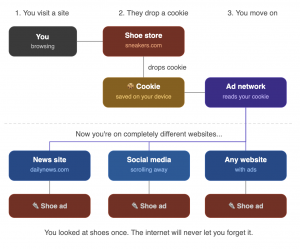
Cookies are small files a website saves on your device when you visit it. They remember things like your login, your language, or what’s in your shopping cart.
The problem is tracking cookies. These follow you across different websites and collect data about what you click, read, and buy. That info gets sold to advertisers.
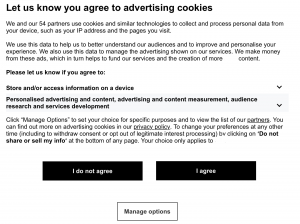
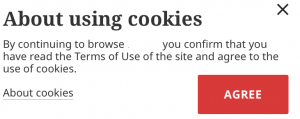
Let’s look at these two banners. They both ask the same question, but in very different ways.
The first one hits you like a wall. Paragraphs, legal terms, buttons that look equal but aren’t. There’s a third option hidden at the bottom. You were meant to miss it. The second one? One sentence. Three buttons. Done.
Same law. Same requirement. But one respects you and one is hoping you’re in a hurry.
That’s why you see an ad for something you Googled once, everywhere you go for the next week.
That’s where data brokers come in. These are companies that collect all those scattered bits of information and package them into a profile. Your name, age, address, relatives, income range, all sitting on some website you’ve never heard of, available to anyone who pays a few dollars. The type of information they trade in is exactly what’s classified as sensitive data.
Creepy? Yes. Stoppable? Also yes.
What Kind of Data Is Out There About You?
Before you start deleting things, it helps to know where to look. Here’s where your personal information usually ends up:
Where your data hides online
-
Data broker sites
Spokeo, Whitepages, BeenVerified, Intelius, MyLife, and hundreds more.
-
Google search results
Old forum posts, news articles, outdated profiles, cached pages.
-
Old and forgotten accounts
Every site you signed up for once still has your email, name, and possibly more.
Social media
Even “private” accounts can leak data through connected apps and third-party scrapers.
-
Public records
Property ownership, voter rolls, court records, business filings. All legally public.
-
Breached databases
If you’ve been in a data breach, your credentials may be floating around in hacker forums. This is some of the most sensitive data there is — and once it’s out, you can’t un-leak it.
How to Actually Remove Your Data (Step by Step)
Start with Google
Google doesn’t own your data. It just shows it. But you can ask them to stop.
Use the “Results About You” tool. Head to myaccount.google.com/data-and-privacy and find “Results about you.” You can request that Google remove search results showing your phone number, home address, or email. It’s free and takes about 5 minutes.
Got a specific link you want gone? Google has a removal request form. Fill it in, explain why, and submit. Results vary, but it’s worth trying.
One thing to remember: even if Google removes the result, the original page might still exist. To fully delete the info, you’ll need to go to that website directly.
Opt Out of Data Broker Sites
This is the big one. Data brokers are the main reason your address and phone number show up when someone Googles you. And they’re legally required to remove your info if you ask.
Here’s where to start:
- Spokeo
- Whitepages
- BeenVerified
- Intelius
- MyLife: contact them via their removal form or email
- PeopleFinder, Radaris, ZabaSearch: search “[site name] opt out” to find their removal page
Fair warning: there are hundreds of these sites. Going through them one by one takes a serious amount of time.
If you’d rather not spend your weekend on this, there’s a faster route: automated data removal services. These tools scan sites where your data appears, then send opt-out and deletion requests on your behalf, citing GDPR, CCPA, and other privacy regulations that companies are legally required to respond to. Some keep working in the background and repeat requests when your data reappears.
A few worth knowing about:
- Incogni (by Surfshark) — sends automated requests to hundreds of data brokers, with ongoing monitoring and a clear dashboard showing progress.
- DeleteMe — one of the more established options, covers major people-search and data broker sites with regular re-removal cycles.
- Optery — has a free tier that shows you exactly where your data is found, with paid plans to handle removals automatically.
- Privacy Bee — broader scope that includes marketing databases and email lists, not just people-search sites.
- Onerep — automated removal across 200+ sites, with a dashboard that tracks what’s been removed and what’s still pending.
None of these are free, but they save hours of manual work and keep your data cleaner over time. If you only do the manual opt-outs once and never revisit, your info will likely creep back within months.
Lock Down Your Social Media
Here’s the thing about social media: you put that information there. So you also have the most power to clean it up.
✓
Check your privacy settings. On Facebook, Instagram, LinkedIn, and X, dig into Settings then Privacy. Make sure strangers can’t see your contact info, location, or friends list. Default settings on most platforms lean toward “share everything,” so go change that.
✓
Delete old posts and photos. Facebook has a “Manage Activity” tool that lets you bulk-delete old content. For X/Twitter, tools like TweetDelete can wipe your history automatically.
✓
Remove connected apps. Go to Settings, then Apps, and check what has access to your account. You’ll probably find a dozen apps you forgot existed. Remove anything you don’t actively use.
Old accounts you never use? Just delete them. A dusty MySpace from 2009 is still a live database entry with your name on it.
Hunt Down Forgotten Accounts
Most people have signed up for way more services than they remember. To find them, search your inbox for “welcome to,” “confirm your email,” or “you’ve registered.” You’ll be surprised how many pop up.
Then head to justdeleteme.xyz, a free directory that shows you how easy (or annoyingly hard) each site makes it to delete your account, with direct links to their deletion pages.
Check If You’ve Been in a Data Breach
Go to haveibeenpwned.com and type in your email. It’s free, and it tells you immediately if your data was leaked in a known breach. If your email shows up, change that password right away. And if you’ve been using the same password on other sites (we’ve all done it), change those too.
Some Data You Just Can’t Erase
Let’s be honest about something: not everything can be removed.
Public records like property ownership, court documents, and voter registration are kept by government agencies. They’re public by law. You usually can’t delete them, though in some cases you can request suppression (a lawyer can help with this).
Old news articles and archived pages tend to stick around. News sites rarely delete published content, and the Wayback Machine archives basically everything. You can ask for removal, but don’t count on it unless you have a legal reason.
Data brokers will try to re-add your info. They pull from public records regularly, so even after you opt out, some of your data may creep back over time. This is an ongoing process, not a one-and-done fix.
What you can do instead:
Set a Google Alert for your name
You’ll get notified any time new content mentioning you appears online, so you can act on it before it spreads.
Use your legal rights (EU, UK, California)
GDPR and CCPA give you the right to demand companies delete your data. They are legally obligated to respond. Most people never use this — which is exactly why companies count on it.
Consider a privacy lawyer for sensitive cases
For sealed court records, abuse cases, or situations where standard opt-outs aren’t enough, a privacy attorney can pursue suppression or removal through legal channels.
How to Stop New Data from Piling Up
Cleaning up your existing data is great. But if you don’t change a few habits, it’ll slowly build back up again. Here’s what actually helps:
Use throwaway email addresses for signups. Tools like SimpleLogin or Apple’s “Hide My Email” create a fake address that forwards to your real one. If a site gets hacked or starts spamming you, just turn off that alias. Your real email stays clean.
Stop giving out your real phone number. When a website asks for it “just to verify your account,” that’s usually just another way to track you. Skip it when you can, or use a Google Voice number.
Switch to a privacy-friendly browser. Brave or Firefox (with the uBlock Origin extension) block most trackers automatically. Pair it with DuckDuckGo instead of Google for searching, and you’ll share a lot less data just by browsing.
Audit your app permissions once in a while. Go to your phone settings and check which apps can see your location, contacts, camera, or microphone. If an app doesn’t need it to work, turn it off.
Use a VPN to hide your IP address. Every website you visit can see your IP address, and through it, your general location and browsing habits. Data brokers use this to build profiles on you without you ever signing up for anything. A VPN replaces your real IP with a different one, so there’s nothing to tie back to you.
Keep the door locked
You cleaned up your data. ZoogVPN makes sure it doesn’t quietly come back.
Every time you go online with ZoogVPN, your real IP is hidden, so advertisers, trackers, and data brokers can’t connect your browsing to your identity. No breadcrumbs. No profile being built.
Think of it as locking the door after you’ve cleaned the house.
You’ve Got This
Removing your personal data from the internet isn’t something you do once on a Tuesday and forget about. It takes a little time upfront, and the occasional check-in after that. But it’s completely doable, and every step makes a real difference.
Start simple: opt out of the big data broker sites, tighten up your social media settings, and delete a few old accounts. Then let a VPN handle the ongoing stuff in the background.
Your data got out there bit by bit. You take it back the same way, one step at a time.
- Roksolana KogutRoksolana dives deep into online privacy, security, and the tools that make the internet work better for everyone. She has a natural taste for taking technical subjects and making them feel approachable, useful, and worth reading.


