

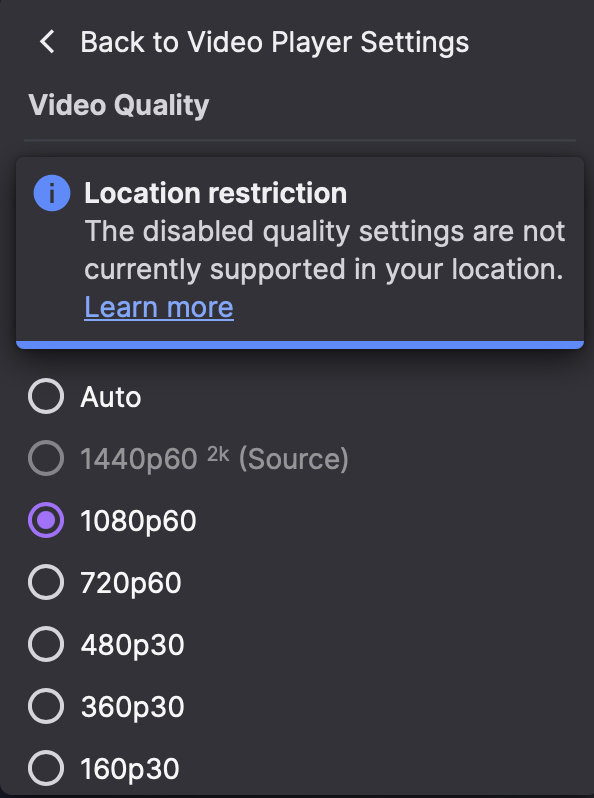
You open a GTA 6 stream, go looking for Twitch 1440p in the quality menu, and it is not there. That is not a bug and you have not missed a setting. Twitch switches 2K viewing on in only a handful of regions, and everywhere else the menu quietly stops at 1080p.
Which is a rough thing to find out on launch day, when half the internet is watching someone else drive around Vice City and your picture looks like it was filmed through a net curtain. Here is the useful bit. The region Twitch thinks you are in is the one part of this you can actually change, and changing it is the entire job ZoogVPN does.
So where does 2K actually work?
Shorter list than you would expect. Here is everywhere Twitch has 2K viewing switched on at the moment.
| Region | Countries with 2K viewing |
|---|---|
| North America | United States, Canada |
| EMEA | Germany, Austria, Switzerland, United Kingdom, Ireland, France, Belgium, Netherlands, Luxembourg, Denmark, Finland, Norway, Sweden, Italy, Spain, Andorra, Portugal |
| MENA | Saudi Arabia, United Arab Emirates, Qatar, Kuwait |
| Latin America | All Latin American countries |
| APAC | Japan, Australia, New Zealand |
Source: Twitch Help, 2k Streaming on Twitch
Now look at what is not on that list. Most of Eastern Europe. Almost all of Asia outside Japan. The whole of Africa, and all of India. That is an enormous number of people watching the exact same broadcast at a lower quality, with nothing on screen to tell them why.
How to get Twitch 1440p back with ZoogVPN
If it was reason one, and it usually is, you are about two minutes from fixing it.
Pick the closest supported country
Go for the nearest country on the list rather than the most glamorous one. Every extra thousand miles is latency you will feel on a live stream. From Eastern Europe that is usually Germany or Finland. From South and Southeast Asia, Japan or Australia. We run 120+ locations across 80+ countries, so most of that 2K list is covered, and the full map is on our server locations page.
Connect, then reload Twitch
Everyone skips this and then decides the VPN is broken. Twitch makes its mind up about your region the moment the player loads, and it is not interested in revisiting that decision. Connect first, then refresh the page.
Sign in to your Twitch account
Not optional, as we covered above. If you cleared your cookies on the way through, you have signed yourself out without noticing, which is almost always the answer when everything else looks right.
Open the quality menu and take your pick
Gear icon in the player, then Quality, and 1440p60 should be sitting there waiting. If it still is not, that channel is streaming at 1080p and there is genuinely nothing left to unlock. Not convinced the connection changed? Our guide on how to check your VPN is working takes a minute and rules out the most common false alarm.
Put yourself in a 2K region
One connection moves you onto the supported list, and the 1440p option appears in the quality menu.
ZoogVPN Pro Tip
Try all of this on a busy channel the day before, not four minutes into the stream you have been waiting a decade for. Launch night is a miserable time to discover your server is three countries too far away.
A quick check before the stream starts
- Connected to a country from the 2K table, as close to home as you can get.
- Twitch reloaded after you connected, not before.
- Signed in to your Twitch account.
- Watching on a desktop browser rather than a phone.
- Watching a channel that is actually broadcasting in 2K.
FAQ
Why is 1440p greyed out on Twitch?
Almost always because of where you are. Twitch switches 2K viewing on in a handful of regions only, and outside them the row is disabled. You do not have to guess either, because Twitch puts a short note in the quality menu telling you which restriction applies. Connect ZoogVPN to a server in one of the supported countries, reload the page, and the option comes back.
Do I need to be signed in to watch Twitch in 2K?
Yes. Twitch keeps the higher resolutions for logged-in viewers, so browsing signed out leaves you on 1080p however good your connection is. Worth checking if you cleared your cookies recently, since that signs you out without any obvious sign.
Why do some channels not offer 2K at all?
Because the streamer decides. Twitch opened 2K broadcasting to all Partners and Affiliates in June 2026, but plenty of channels still go out at 1080p, and nobody can watch a resolution that was never sent. Larger channels are the best bet when you want to test your setup.
Can I watch Twitch in 1440p on the ZoogVPN free plan?
Yes. Four of our five free locations sit inside 2K regions: Washington in the United States, London in the United Kingdom, Dusseldorf in Germany and Amsterdam in the Netherlands. The free plan includes 10 GB of data a month, which is plenty for testing the difference and watching the occasional stream. For longer sessions at 1440p we would point you at a premium plan. Here is our comparison of free and paid VPN plans.
Which ZoogVPN server is best for Twitch 2K?
The closest one that appears in the 2K table. Latency matters more here than the country itself, so a viewer in Poland is better served by Germany than by the United States. We give you 120+ locations across 80+ countries with unlimited switching, so try two or three and keep whichever holds 1440p most steadily.
Which devices support Twitch 2K viewing?
A reasonably modern desktop or laptop browser. Twitch names older mobile devices, TV devices and game consoles as unable to support 2K viewing, and even on a computer you may need to update your browser or switch on hardware acceleration first. We cover the rest of your devices regardless, with apps for Windows, Mac, Linux, iOS, Android, Android TV, Amazon Fire TV and routers, on up to 10 devices per plan.
Does a VPN slow down Twitch?
Routing through another country adds a small amount of overhead, and the further away that country is, the more you notice it. We run dedicated bare metal servers at 1 Gbps with modern protocols including WireGuard, so a nearby location leaves plenty of headroom for 1440p60. Choosing the closest supported country is the single biggest thing you can do.
Does ZoogVPN keep logs of what I watch?
No. We operate a strict no-logs policy, and we are registered in Greece, outside the 14 Eyes alliance. Your traffic is encrypted with AES-256, and a kill switch stops anything leaking if the connection drops. There is more on our VPN for Twitch page.
Watch the launch in the quality it was made for
Twitch picks your resolution by region, which feels deeply unfair right up until you realise how easily it is changed. Land in a 2K region and 1440p is yours in seconds.
Get ZoogVPN
Save 75% off today
$2.49
/mo $9.99
- Up to 10 devices
- 140+ servers and 80+ countries
- Independently audited no-logs
- 24/7 live support