

Your phone knows things about you that even your closest friends don’t. Where you went last Tuesday. How long you slept. Which apps you opened at 2am. It knows your daily coffee stop, your commute, and sometimes your political views.
And unlike a nosy friend, it doesn’t keep that information to itself.
The good news is you can do something about it. But first, let’s look at exactly what’s being collected – and by whom.
What iOS and Android Collect by Default
Both Apple and Android collect data about how you use your device. The difference is mostly in how openly they talk about it.
Apple (iOS)
Apple has built its entire brand around privacy – and to be fair, they’ve done real work there. But iOS still collects:
You can opt out of a lot of this – but the defaults are often set in Apple’s favour, not yours. We’ll cover how to change that below.
Android
Google’s business is advertising. Data is the foundation of that business. Android, by design, feeds that machine. What Google collects:
The uncomfortable part: even when you turn off location history on Android, Google can still log your location through other means – like Wi-Fi networks you connect to or IP addresses. This was proven in court. It’s not a conspiracy theory.
And Android is only part of the picture. Google collects data across every product it makes – including Chrome, which runs on billions of devices regardless of operating system. In May 2025, it emerged that Chrome had silently downloaded a 4 GB AI model (Gemini Nano) to users’ devices without any notification or consent. No prompt, no checkbox, nothing. Delete it manually, and Chrome re-downloads it on next launch. On Windows, stopping it requires editing the system Registry. On Mac, it means digging through hidden browser flags. Privacy researchers noted this behavior may violate EU ePrivacy rules, which require clear consent before storing data on a user’s device. Source
This isn’t a bug. It’s a pattern: Google decides what goes on your device, and you find out later – if you find out at all.
What Your Apps Are Collecting
Your phone’s operating system is just the start. The apps you’ve installed are often far more aggressive about data collection – and most people have no idea what they’ve agreed to.
Location
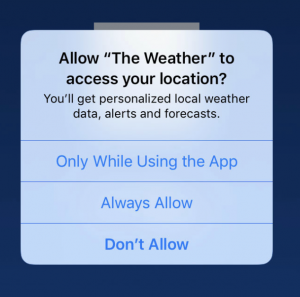
When you allow an app access to your location, you’re not just letting it know you’re in London. You’re giving it a record of everywhere you go. Retailers use this to know when you walk into a competitor’s store. Advertisers build profiles based on which neighbourhoods you visit. Some apps sell this data to third parties – including ones you’ve never heard of.
The “while using app” option is much safer than “always.” Most apps don’t actually need your location 24/7, even if they ask for it. But, our personal recommendation is, if you are unfamiliar with an app and cannot indicate if it’s trustworthy, do not share your location.
Microphone and Camera
Have you ever talked about something – a trip, a product, a random craving – and then seen an ad for it minutes later? Many people have. While it’s hard to prove apps are constantly listening, what we do know is that some apps request microphone access for no obvious reason (a flashlight app? really?). Once you’ve granted access, you’ve handed over the key.
Contacts and Calendar
When an app uploads your contacts, it doesn’t just learn about you – it learns about every person you know, including people who never agreed to anything. Social apps use this to map your relationships. That data gets merged with other sources to build a profile that goes far beyond what you volunteered.
Device Identifiers and Behavior
Apps can also track your device’s unique identifiers, which browser you use, your screen brightness, battery level, even how you hold your phone. Individually, these seem trivial. Combined, they create a fingerprint specific enough to identify you even if you’ve turned off all the obvious tracking settings.
What Your Carrier Collects
Your mobile carrier – Vodafone, EE, O2, T-Mobile, AT&T, whoever it is – can see everything that travels through their network. And unlike apps, they don’t even need your permission. This includes:
Carriers in many countries have been caught selling location data to third parties – including data brokers, insurers, and even law enforcement – without users knowing. In the US, major carriers paid hundreds of millions in fines for exactly this. In Europe, GDPR provides more protection, but carriers still collect significant amounts of data by default.
How to Check and Limit Data Collection on Your Phone
You can’t eliminate data collection entirely – your phone needs some information to function. But you can dramatically reduce what gets shared, and with whom. Here’s where to start.
On iPhone (iOS)
On Android
What a VPN Does (and Doesn’t) Protect
Adjusting app permissions handles a lot. But there’s one thing you can’t fix through your phone’s settings: your network-level traffic.
Every time your phone connects to the internet – whether on mobile data or Wi-Fi – your carrier, your ISP, and any network you’re connected to can see what you’re doing. They see which sites you visit, which apps call home, and where you’re connecting from.
A VPN changes that. When you connect through ZoogVPN, your traffic is encrypted before it leaves your phone. Your carrier sees encrypted data, not your browsing. Your IP address – the identifier that links your traffic to your location and identity – gets replaced by the VPN server’s address. Apps and websites can no longer use your IP to build a location profile on you.
It’s not magic – a VPN doesn’t stop an app from accessing your microphone if you’ve already granted permission. But it closes off the network-level tracking that’s invisible to most people, and it’s especially valuable on public Wi-Fi, where your data is otherwise wide open.
ZoogVPN works on both iOS and Android, uses AES-256 encryption and modern protocols like WireGuard, and keeps no logs of your activity. One subscription covers up to 10 devices – so your phone, tablet, and laptop are all covered.
You Can’t Opt Out of the Internet – But You Can Opt Out of Being an Open Book
Data collection is baked into the way modern phones work. Your operating system collects it, your apps collect it, your carrier collects it. Most of the time, you agreed to it buried somewhere in a terms of service nobody reads.
But knowing what’s being collected – and where the switches are – puts you back in control. Go through your permissions. Turn off what you don’t need. Check your Google and Apple account settings. And protect your network traffic with a VPN.
Your phone is incredibly powerful. It doesn’t need to be a tracking device too.
Stop your phone from being an open book.
ZoogVPN encrypts your traffic, hides your IP, and keeps your browsing private – on every device you own.
- Roksolana KogutRoksolana dives deep into online privacy, security, and the tools that make the internet work better for everyone. She has a natural taste for taking technical subjects and making them feel approachable, useful, and worth reading.


