

You’ve probably seen the headline by now. “The VPN is dead. Zero Trust killed it.” It shows up in every cybersecurity roundup, usually next to a stock photo of someone frowning at a laptop in a dark room. It’s dramatic, and it’s meant to be, because a scary headline gets more clicks than a nuanced one ever will.
Here’s the less exciting but far more useful version of the truth: that headline is only half right. Zero Trust is not really a consumer privacy tool. It is a corporate security approach, designed for organizations that need to verify users, manage devices, and control access to internal apps and systems. In that context, yes, ZTNA is replacing a specific kind of business VPN.
What Is Zero Trust, Actually?
Zero Trust is a security philosophy, not something you download and install. The name gives away most of what you need to know: never trust, always verify. Under the old way of thinking, a company network worked a bit like an office building. Once you badged in through the front door, you could wander into pretty much any room, because the assumption was that if you got past the door, you were probably fine.
Zero Trust throws that assumption out entirely. Every room checks your badge again. Every request for a file, an app, or a server gets verified on the spot, no matter who is asking or where they happen to be sitting that day. It’s a bit less convenient and a lot harder to sneak past.
Three ideas hold the whole model together:
- Verify explicitly: check identity and context every time, not just once at login.
- Least-privilege access: people get access to exactly what they need for the task in front of them, and nothing more.
- Assume breach: build the system as though someone has already gotten in, so any damage stays contained.
Notice what’s missing from that list. Nothing about hiding your IP address. Nothing about encrypting your traffic. Zero Trust is about deciding, constantly, whether the person or device asking for something should actually be allowed to have it.
Where the “Zero Trust Replaces VPN” Idea Comes From
To understand the confusion, you need to meet ZTNA, short for Zero Trust Network Access. This is the one piece of Zero Trust that genuinely does compete with something familiar: the corporate remote-access VPN.
Think about how a lot of companies still operate. An employee connects to the company VPN, and once they’re in, they usually get fairly broad access to internal servers, shared drives, and tools. The VPN’s entire job is to make a laptop in someone’s kitchen behave as though it’s plugged straight into the office network. That’s exactly the “trusted once you’re inside” model Zero Trust was built to eliminate.
So companies are gradually swapping that kind of VPN for ZTNA, which checks each request against each individual app instead of handing over a master key to the whole internal network. If your IT team has been talking about ZTNA in meetings, this is what they mean. And yes, in that specific context, Zero Trust genuinely is replacing a VPN.
The distinction that actually matters:
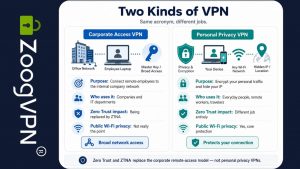
Corporate access VPN lets an employee’s device onto the company’s internal network.
Personal privacy VPN encrypts your own traffic and hides your IP so your browsing stays yours, on any Wi-Fi, anywhere.
Zero Trust and ZTNA were built to replace the first one. They were never designed to touch the second.
Two Kinds of VPN, Side by Side
Here’s the part that gets lost in translation, and it’s really the whole point of this article: “VPN” is quietly doing double duty as a word for two unrelated tools.
What Zero Trust Does Not Do for You Personally
Zero Trust, no matter how well your company implements it, will not:
- Encrypt your laptop’s connection at the airport gate
- Hide your IP address from the streaming site or shopping site you’re browsing on your own time
- Stop your internet provider from logging which sites you visit
- Give you a different virtual location so you can watch something that isn’t available where you live
None of that is a knock on Zero Trust. It was never trying to do any of those things. It’s a workplace access model, not a personal privacy tool. Asking Zero Trust to protect your home Wi-Fi is a bit like asking your office key card to also lock your front door. Right idea, completely wrong door.
Can They Work Together? Easily
A privacy VPN and Zero Trust operate at completely different layers, so there’s no conflict in running both at once. Picture a remote worker on a Tuesday morning: ZTNA gets them securely into the specific work apps they’re cleared to use, checking their identity at every step along the way. Meanwhile, a personal VPN wraps their entire connection so that whatever cafe, hotel, or airport Wi-Fi they’re using can’t be snooped on by anyone else sitting nearby, and their ISP doesn’t get to log every site they visit outside of work hours either.
Same laptop, two tools, two completely different jobs, and zero overlap between them.
So, Does Zero Trust Replace a VPN?
For a company managing how remote employees access internal systems, increasingly yes, ZTNA is taking over that job. But for personal use, it is a very different story. Zero Trust can create more friction than convenience for an everyday user: extra verification steps, access restrictions, device checks, and a setup that was built for corporate control rather than casual browsing. Commercial VPNs, on the other hand, are designed around real, normal internet use: quick connection, public Wi-Fi protection, location privacy, streaming, travel, and keeping browsing activity away from unnecessary third parties.
So, for your own personal privacy, security on public networks, and control over who gets to see your browsing habits and location, no. That job still belongs to a personal VPN, and Zero Trust was never really trying to take it in the first place. Different tool, different problem, and both can matter to the same person on the very same day.
Personal privacy still needs a personal tool
Zero Trust protects your workplace
ZoogVPN protects you
Your company might be rolling out Zero Trust for its own systems, and that’s a good thing. But none of that reaches your phone at a cafe, your laptop at the airport, or the shows you want to watch without your ISP keeping a log. That part is still on you, and it’s exactly what ZoogVPN is built for.
- Roksolana KogutRoksolana dives deep into online privacy, security, and the tools that make the internet work better for everyone. She has a natural taste for taking technical subjects and making them feel approachable, useful, and worth reading.


