

Asking whether you need a VPN is a bit like asking whether you need curtains. Technically, no. You find out otherwise the evening you notice how many windows face the street.
The honest answer to “do I need a VPN?” is probably yes, but not for every reason the ads suggest. This guide covers the situations where a VPN protects you, the ones where it does very little, and how to tell which group you’re in. It uses current data from the FBI, Security.org, and Access Now.
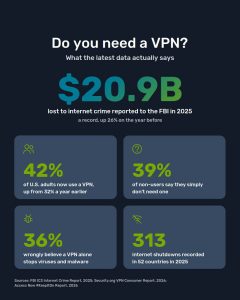
lost to internet crime reported to the FBI in 2025
of U.S. adults now use a VPN, up from 32% a year earlier (Security.org)
Americans connect to public Wi-Fi with no VPN or antivirus (Panda Security)
internet shutdowns in 52 countries in 2025 (Access Now)
Do you need a VPN? A 30-second self-check
Adoption is climbing, yet the biggest reason people give for skipping a VPN is still that they don’t think they need one. In Security.org’s 2026 survey, 39% of non-users said exactly that. Check which of these describe your week before deciding.
You need one
You use café, hotel, airport, or train Wi-Fi, even occasionally, and log into anything while connected.
You need one
You live in or travel to a country that blocks apps like WhatsApp, Instagram, or news sites.
Strongly worth it
You don’t want your internet provider logging every site you visit and what time you visit it.
Strongly worth it
You work remotely or handle client files, invoices or banking from different networks.
Strongly worth it
You travel and want your home services, from banking apps to streaming subscriptions, to behave as usual.
Optional
You only browse at home on your own network and don’t mind your provider seeing where you go.
What a VPN actually does, in plain terms
A VPN (virtual private network) does two things. It encrypts the traffic leaving your device, and it swaps your real IP address for the address of a VPN server. Websites see the server, and your network and internet provider see scrambled data. They can tell you are connected, but not what you are doing.
Step 1: Your device
Traffic is encrypted before it leaves your phone or laptop.
Step 2: Encrypted tunnel
Your Wi-Fi owner and ISP see unreadable data only.
Step 3: VPN server
Decrypts the request and sends it out under its own IP.
Step 4: The website
Sees the server’s location, not yours.
7 situations where you need a VPN
These are the cases where a VPN changes the outcome, not just the feeling of being safe. Each one is paired with the part of ZoogVPN that handles it, so you can see what you are paying for.
Seven problems, one app
Encryption, tracker blocking and a kill switch on up to 10 devices, with no activity logs.
What a VPN won’t do for you
Overselling VPNs is the main reason people stop trusting them. In the Security.org survey, 36% of respondents wrongly believed a VPN alone protects a device from viruses and malware. Here is where the line actually sits.
Myth: A VPN makes me anonymous online.
Reality: It hides your IP and traffic, but accounts you log into, cookies and browser fingerprints still identify you.
Myth: A VPN replaces antivirus.
Reality: DNS filtering blocks known bad domains, but a file you download and open still needs a malware scanner.
Myth: Any free VPN does the same job.
Reality: Many free apps fund themselves with ads or data. Choose a provider with a published no-logs policy and a paid plan behind the free tier.
The right way to think about it
A VPN is one layer, alongside a password manager, two-factor authentication and software updates. It is the layer that protects your connection itself, and none of the others do that.
Why ZoogVPN is a sensible first VPN
When people who don’t use a VPN explain why, cost and setup come up alongside “I don’t need one”. Security.org also found 62% of people rate a no-logs policy as very or extremely important. ZoogVPN was built around those three concerns.
What you get
Shield blocking. Ads, trackers and malicious domains are filtered before the page loads.
AES-256 and a kill switch. Strong encryption, plus nothing leaks if the connection drops.
Zero logs, Greek jurisdiction. No activity records, and no mandatory data-retention law behind us.
10 devices or your whole router. Cover the family’s phones or the entire home network.
Shadowing for restrictive networks. Hides VPN traffic where it is actively blocked.
A real free plan. 10 GB a month with no credit card, plus a money-back guarantee on premium.
Your connection with and without ZoogVPN
| Who can see what | Without a VPN | With ZoogVPN |
|---|---|---|
| Your ISP | Every domain you visit, and when | An encrypted connection, nothing more |
| Public Wi-Fi owner | Your device, domains and unencrypted app traffic | Scrambled data only |
| Websites and advertisers | Your real IP and approximate location | The server’s IP; trackers blocked by Shield |
| Network censors | Can block apps and sites directly | See disguised traffic with Shadowing |
Frequently asked questions
Short answers to the questions people ask most often before getting their first VPN.
Do I need a VPN at home?
Not strictly, but it’s worth it if you don’t want your ISP building a profile of your browsing, or if your home has many smart devices. A router install covers all of them at once.
Do I need a VPN on my phone?
Yes, if it ever joins Wi-Fi outside your home. Phones hop between networks more than any other device, and they carry your banking, email and messaging apps.
Is a free VPN good enough?
A free tier from a provider with a published no-logs policy is fine for light use. ZoogVPN’s free plan gives you 10 GB a month. Be wary of free apps with no paid product, as the data is often what’s being sold.
Will a VPN slow down my internet?
Slightly, because traffic takes an extra stop. Choosing a nearby server keeps the difference small, and if your ISP throttles certain traffic, a VPN can make things faster.
Is using a VPN legal?
In most countries, yes. A few restrict or regulate VPNs, and illegal activity stays illegal with or without one, so check local rules before you travel.
Does a VPN protect online banking?
It protects the connection, which matters most on public networks. It won’t stop a phishing page you choose to log into, though ZoogVPN’s Shield blocks many known fake domains before they load.
Answer the question once, then stop thinking about it
ZoogVPN encrypts your connection, blocks trackers and scam domains, and runs on up to 10 devices with a strict no-logs policy. Start free or go premium.
- Diana BestaievaContent Writer at ZoogVPN. Diana deeply explores the newest technologies and shares valuable insights engagingly and comprehensively. Keeping up with the tech news, she makes in-depth content, explaining complex concepts with ease.


