

How to Tell If a Website Is Safe Before You Enter Personal Information
You’re two clicks away from buying concert tickets, or maybe logging into what looks exactly like your bank’s website, when a tiny voice in the back of your head says: wait, is this thing legit?
That voice is worth listening to. Most online scams don’t rely on hacking anything. They rely on you trusting a page just long enough to type in your email, your card number, or your password. So before you hand over any personal information, it’s worth spending fifteen seconds checking the site itself. Here’s exactly what to look for.
The padlock icon isn’t the safety check you think it is
The first and easiest indicator of a secure website is the URL in your browser’s address bar. Look for “https://” at the beginning of the web address and a padlock icon next to it.
🔐 Why this matters:
The “S” in HTTPS stands for “secure,” meaning the site uses SSL/TLS encryption to protect data exchanged between your browser and the website.
This encryption prevents attackers from intercepting or tampering with your information, like passwords or credit card details, as it travels across the network.
However, keep in mind that HTTPS alone does not guarantee absolute safety. A malicious site can also obtain a valid SSL certificate, so encryption is necessary but not sufficient. Organizations can strengthen trust by implementing certificate lifecycle management tools like AppViewX to ensure certificates are properly issued, renewed, and revoked.
Read the actual web address, not just the name
Scam pages are built to be glanced at, not read carefully, so this is exactly where they get sloppy. Look closely at the domain name before you do anything else on the page.
A few things scammers love to do:
- Swap letters or add extras:
amaz0n-support.com,paypa1.com,netfliix-billing.com - Add an extra word before the real domain to make it look official:
secure-appleid.cominstead ofapple.com - Use a different ending:
yourbank-online.netwhen the real site is .com - Use lookalike characters from other alphabets that render almost identically to Latin letters, so a domain can look pixel-perfect and still not be the site you think it is
The trick is to actually read the domain letter by letter once, especially if you clicked a link from an email or text rather than typing it yourself. If anything about the spelling feels the tiniest bit off, close the tab.
Check whether anyone actually stands behind the site
Real businesses generally aren’t shy about who they are. Scroll to the footer or the “About” or “Contact” page and see what’s there.
You want to see a real address, a working phone number or support email, and some indication of who’s behind the operation. If all you find is a contact form and nothing else, or the “About Us” page is three vague sentences about “passion for quality,” take that as a signal, not proof of guilt on its own, but a reason to look closer at everything else.
Let a second opinion weigh in
You don’t have to be your own private investigator here. A few free tools will tell you what they know about a site in seconds:
- Google Safe Browsing (or just search “is [site] safe”) flags known malicious sites
- A quick WHOIS lookup shows how old a domain is; a site claiming to be an established retailer but registered three weeks ago is telling you something
- Reviews on Trustpilot, Reddit, or the BBB can surface complaints fast, though watch for pages with only five-star reviews written in suspiciously similar language, since those get manufactured too
None of these tools are perfect on their own, but stacking two or three of them takes you from guessing to actually knowing.
Notice how the site is trying to make you feel
Legitimate businesses want you to make a calm, informed decision, because a calm customer is a repeat customer. Scam sites want you to panic-click before your brain catches up. Watch for:
- Countdown timers claiming the deal disappears in nine minutes
- Pop-ups insisting you’ve “won” something the moment you land
- Pressure to pay by wire transfer, gift cards, or crypto, since those payments can’t be reversed
- Prices so far below normal that they’d be a loss for any real seller
If a site is rushing you, that’s the whole strategy. Slow down on purpose.
Look at the checkout page specifically
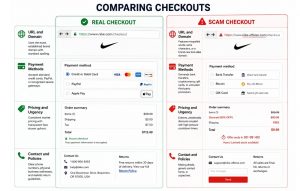
Even if the rest of a site seems fine, the checkout is where your financial details are actually on the line, so give it its own once-over. Reputable payment processors like Visa, Mastercard, PayPal, or Stripe should be visible, and the checkout URL should still show HTTPS. Trust badges and security seals can be faked by simply pasting in an image, so if one looks important, click it. A real seal links to a verification page; a fake one just sits there looking official.
Where a VPN actually helps (and where it doesn’t)
This is worth being honest about: a VPN won’t tell you whether a website is a scam. That’s not what it’s built for, and any tool that claims otherwise is overselling itself.
What ZoogVPN does do is encrypt the connection between your device and the internet, which matters most on networks you don’t control, like hotel WiFi, an airport lounge, or a coffee shop you’re working from between meetings. On an open network, someone nearby can potentially intercept unencrypted traffic; a VPN closes that door. It also hides your real IP address, which helps with location-based price gouging and keeps your browsing from being tied straight back to your physical location.
For remote workers logging into company systems from unfamiliar networks, that combination (encrypted traffic plus a hidden IP) is a genuinely useful layer of protection. Just keep it in its lane: a VPN protects the pipe your data travels through. It’s still on you to check what’s waiting on the other end.
Protect Your Connection
Encrypt Every Network You Connect To
Whether you’re working from a hotel lobby or just don’t like the idea of a stranger on the same WiFi peeking at your traffic, ZoogVPN locks down your connection in one tap, on any network, in seconds.
The fifteen-second checklist
Before you type anything personal into a site you’re not 100% sure about:
- Is there HTTPS, and does the domain spelling match the real brand exactly?
- Is there a real address, phone number, or support contact?
- Does a quick search or Safe Browsing check turn up any warnings?
- Is the site pressuring you to act immediately?
- Does the checkout use a recognizable, legitimate payment processor?
If a site passes all five, go ahead with confidence. If it fails even one, that’s not paranoia talking, that’s a reasonable person protecting their own information. And if you’re doing any of this browsing from a network you don’t fully trust, running ZoogVPN in the background means at least the connection itself isn’t the weak link.
- Roksolana KogutRoksolana dives deep into online privacy, security, and the tools that make the internet work better for everyone. She has a natural taste for taking technical subjects and making them feel approachable, useful, and worth reading.


